
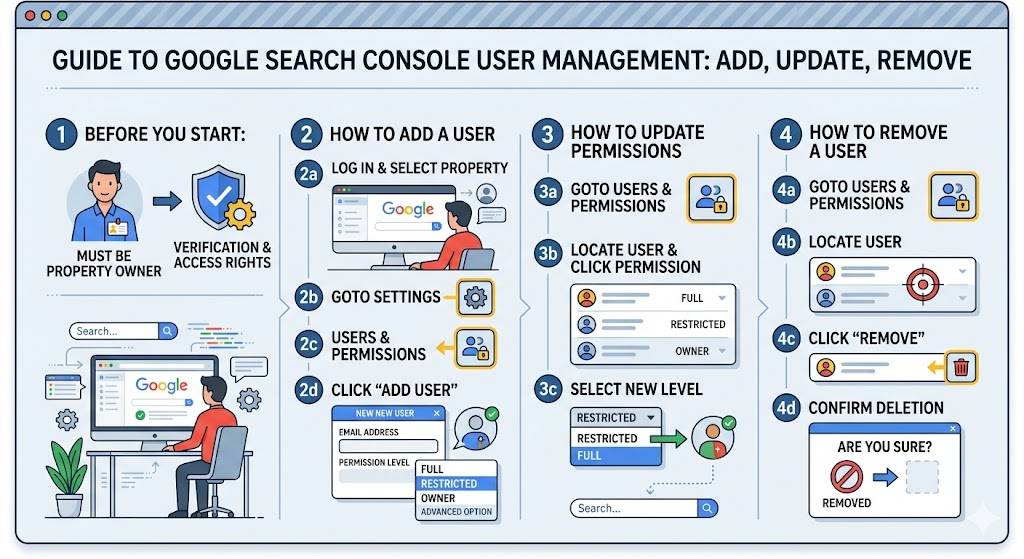
Sometimes, you may be asked to give access to your Google Search Console property. For example, teams at Yoast may request temporary access to help troubleshoot an issue. Each Yoast team uses a shared Google account, so a team member will provide the specific email address that should be added. After your issue is resolved, make sure to remove their access.
How to add a user to your Google Search Console property
- Open the user administration section in Google Search Console.
- Choose the verified property you want to manage.
- Navigate to Settings, then select Users and Permissions.
- Click Add user.
Keep in mind that a Google Search Console property can include up to 100 users with either full or restricted access.
- Enter the email address that was provided to you and set the permission level to Full.
Full access is typically requested because it allows tasks such as submitting a sitemap. If you prefer to manage these changes yourself, you can grant Restricted access instead.
- Click Add to complete the process.
How to change permissions for an existing user
- Go to the user administration area in Google Search Console.
- Select the verified property you want to edit.
- Under Settings, open Users and Permissions.
- Click the three-dot menu next to the user whose permissions you want to modify.
- Select Change permissions.
- Choose the new permission level and click Save.
How to remove a user from your Google Search Console property
- Open the user administration section in Google Search Console.
- Select the verified property.
- Go to Settings and then Users and Permissions.
- Click the three-dot menu next to the user you want to remove.
- Select Remove access.
- Confirm the action by clicking Remove user.
FAQs
What is user access in Google Search Console?
User access in Google Search Console allows website owners to give other people permission to view or manage data for a specific property. This makes it easier for teams such as developers, marketers, or SEO specialists to collaborate on website performance and optimization.
What types of user permissions are available in Google Search Console?
There are generally two main types of permissions: full access and restricted access. Full users can view all data and perform most actions, while restricted users can only view reports and limited information.
Who should be given access to a Google Search Console property?
Access is usually given to SEO professionals, web developers, digital marketers, and website administrators who need to monitor search performance or fix technical issues affecting visibility in Google search results.
Can multiple users access the same Search Console property?
Yes, multiple users can access the same property. The verified owner of the property can add several users and control the level of access each person receives.
What is the difference between a property owner and a user in Google Search Console?
A property owner has complete control over the property, including the ability to add or remove users, change settings, and manage verification. Regular users can view data or perform certain actions depending on their permission level.
How do you remove a user from Google Search Console?
To remove a user, the property owner can go to the settings section in Google Search Console, open the users and permissions panel, select the user, and remove their access.
Can a removed user still see website data in Search Console?
No, once a user is removed from a property, they immediately lose access to its data and reports.
Why is it important to manage user permissions in Search Console?
Managing permissions helps protect your website data and ensures that only authorized people can access or modify important settings.
Can you update a user’s permission level later?
Yes, property owners can change a user’s permission level at any time, for example upgrading a restricted user to full access if their responsibilities change.
Is it safe to give developers access to Google Search Console?
Yes, giving developers access can help them identify technical issues such as indexing errors, crawl problems, and performance issues that may affect your website’s visibility in search results.